IXEGORA CLOCK · ELECTRONIC TIME RECORDING

Electronic recording of working hours is now law in Mexico. Be ready before January 1.

Ixegora Clock records when each person starts and ends work, on a tablet or from their phone, with the server's time, chained records that cannot be altered without it showing, and the agreement that documents each person's consent, which is what the law requires for full evidentiary weight. No time clocks to buy.

The labour ministry (STPS) rules take effect on January 1, 2027

No card to request access · Live in days, not months · Data hosted securely

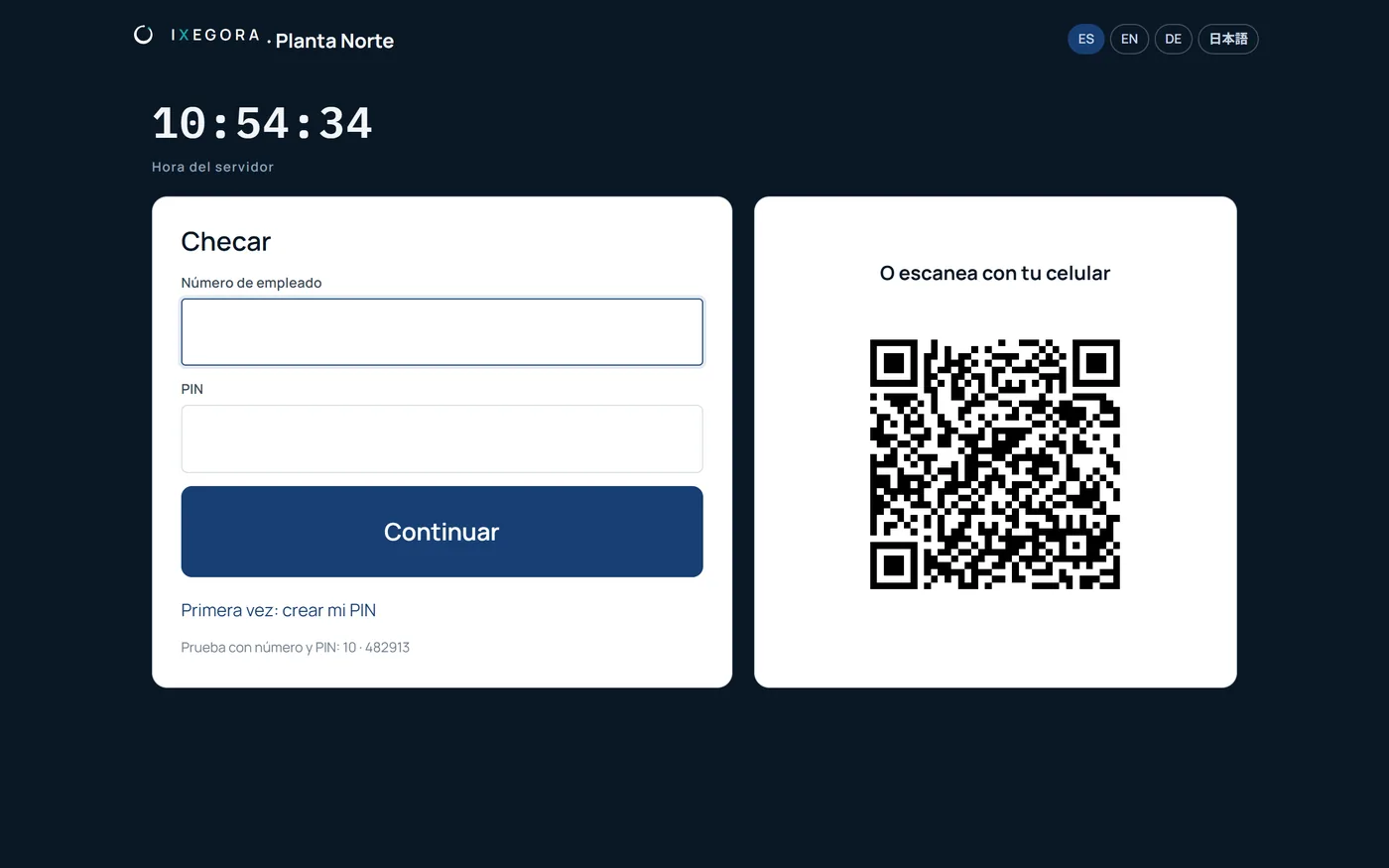
Real screen of the Ixegora Clock tablet: check-in with employee number and PIN, and a QR code that changes every 30 seconds
WHAT THE LAW SAYS

What the 40-hour reform requires, and what non-compliance costs

The decree published in Mexico's Official Gazette (DOF) on May 1, 2026 added section XXXIV to article 132 of the Federal Labour Law: employers must electronically record each worker's working hours, including start and end times, and provide them to the authorities on request.

Jan 1, 2027

The STPS rules take effect

The provisions setting who the obligation applies to and its exceptions take effect on January 1, 2027 (fifth transitional article). The obligation itself has been in the law since May 1, 2026.

$29,327 to $586,550 MXN

Fine for not keeping the record

From 250 to 5,000 UMA (art. 994, sec. IV Bis; 2026 UMA: $117.31 MXN). If the omission affects several people, the fine applies for each one (art. 992).

Full evidentiary weight

If the record was agreed

The record carries full evidentiary weight if it is shown that worker and employer agreed to it (art. 132, sec. XXXIV). In a dispute, the employer must prove the working hours (art. 784, sec. VIII).

Electronic time recording 2027: what the 40-hour reform requires

What article 132, section XXXIV says, when it applies, what to record, full evidentiary weight and the fine.

Read the guide

General information based on the text published in the DOF; not legal advice. Review your case with your labour lawyer.

WHAT WE HEAR

The reasons to wait, and why they don't hold

Hardly anyone starts without first asking whether it really applies to them. These are the most common doubts, and what Clock does with each one.

“We already have a time clock.”

What already works

It may do the job if it records each person's start and end time and you can export it. Check whether it documents the agreement with each person, which the law requires for full evidentiary weight, and keeps a trail of who corrected what. The table below tells you what to look for.

“We keep it in Excel.”

Today's record

It is an electronic file, but someone types the time. It can be changed without a trace and does not prove who checked in or when. In Clock the server sets the time and each record is chained to the previous one.

“Our people don't have company phones.”

The equipment

They don't need one. With a tablet at the entrance people check in with their employee number and a PIN. The phone is optional, for field staff or sites without a tablet.

“Let's wait for the STPS rules.”

The calendar

The obligation has been in the law since May 1, 2026. The rules will set who it applies to and the exceptions on January 1, 2027. Starting in December leaves no time for the agreement or for people to get used to it.

YOUR CURRENT FORMAT

Does what you use today work for the law?

The law requires an electronic record of each person's start and end time that you can hand to the authorities. For it to also carry full evidentiary weight, it has to be agreed with each person.

FormatVerdictWhy
Paper or a signed list Not enough It is not an electronic record, which is what the law requires.
Excel or a record typed by hand Hard to defend Someone types the time: it can be changed without a trace and does not prove who checked in or when.
Time clock that can't export Falls short It records, but if you can't pull the history by person and period, or punches can be deleted, you have nothing to hand over.
Time clock that exports Can work Check that you have an agreement accepted by each person and that corrections keep their reason and who approved them.
Ixegora Clock Built for this Server time, an agreement per person, corrections with a trail and a records file per period to hand over.
If you switch, it's by date

Clock records from the day of setup; old punches are not loaded, because a record someone uploads later no longer proves the time. Keep what your previous system stored: attendance records are kept for the last year and one more after the employment ends (art. 804).

Based on the text of the law and on what a record needs to serve as evidence. The STPS will publish the scope and exception rules; this is not legal advice.

FOR DECISION-MAKERS

Every area comes with a different question

Management

“What could it cost us not to do it?”

Fines of 250 to 5,000 UMA for each person affected, and in a dispute the company has to prove the working hours. With Clock the record is ready to show.

HR and payroll

“Is this going to mean more work?”

Less: lateness, absences, overtime and night hours are calculated against the shift, and corrections arrive as requests with their approval.

Legal

“Does this hold up if we're sued?”

An agreement accepted by each person, chained records that can't be altered without it showing, and a sealed records file per period.

Operations

“What if there's no network or no tablet?”

People check in from their phone, and offline the record is stored and sent on its own when the connection returns.

HOW PEOPLE CHECK IN

With what you already have: a tablet or a phone

Tablet with PIN

At the site entrance: employee number and a PIN only that person knows.

QR from the phone

The tablet shows a code that changes every 30 seconds; the person scans it with their account.

Phone with fingerprint and location

For field staff and sites without a tablet. The phone signs with its own fingerprint or face, and location is taken only at check-in.

Offline too

If the network goes down, the tablet stores the check-in encrypted and sends it on its own when the connection returns, and the phone signs it on the spot. It arrives flagged, with the device's time and the time it arrived.

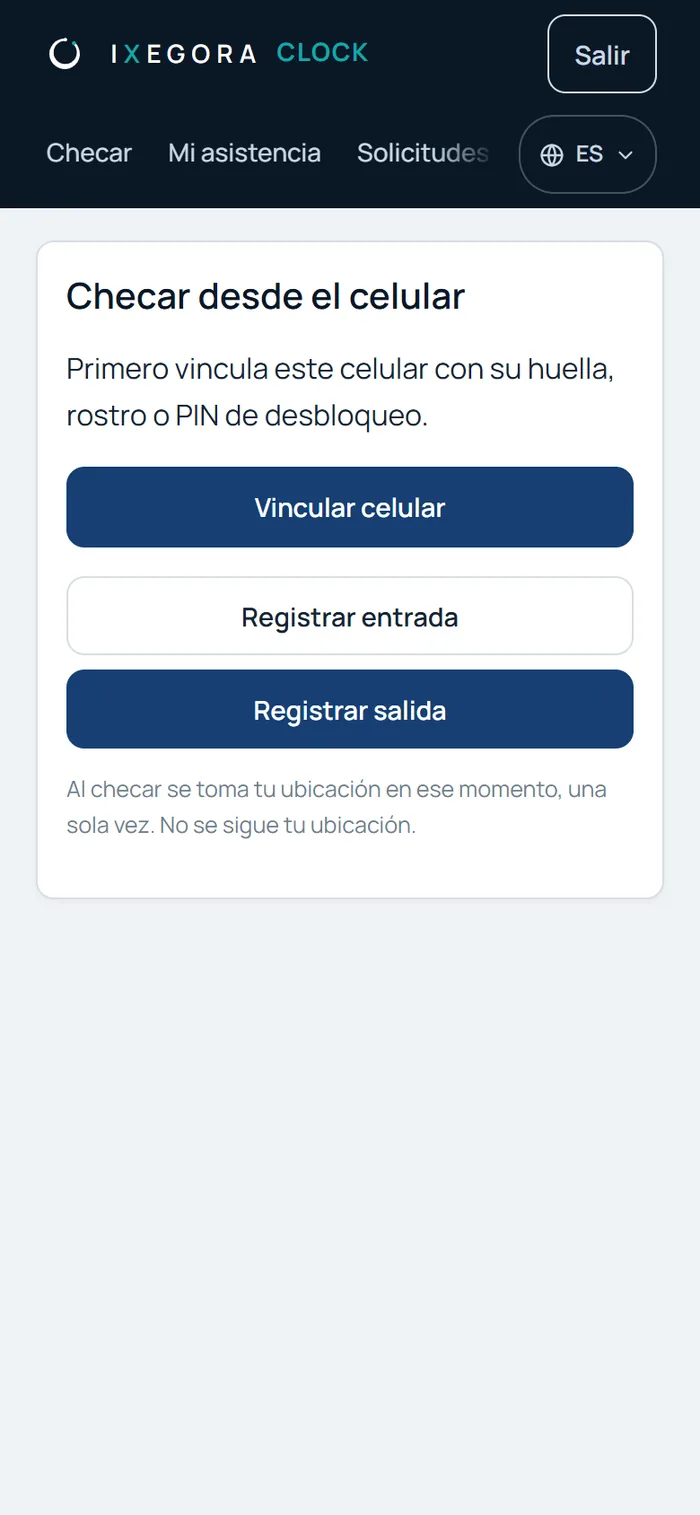
Real screen of Ixegora Clock on a phone: check in with the phone's own fingerprint or face
FROM SETUP TO RECORDS FILE

Five steps, and the month is sealed

  1. 01

    Setup

    Sites with their time zone and geofence, people by CSV, shifts and tablets.

  2. 02

    Agreement

    Each person accepts it once, in their account or on the tablet: that documents the agreement the law requires for full evidentiary weight.

  3. 03

    Check-in

    With the server's time, not the device's. Anything outside the geofence is recorded and goes to review.

  4. 04

    Shifts and calculation

    Lateness, absences, overtime, night hours and Sundays, against each person's shift.

  5. 05

    Close and records file

    The supervisor validates, the person confirms or objects, and HR closes the sealed period.

WHAT YOUR TEAM SEES

Attendance, review and evidence in one place

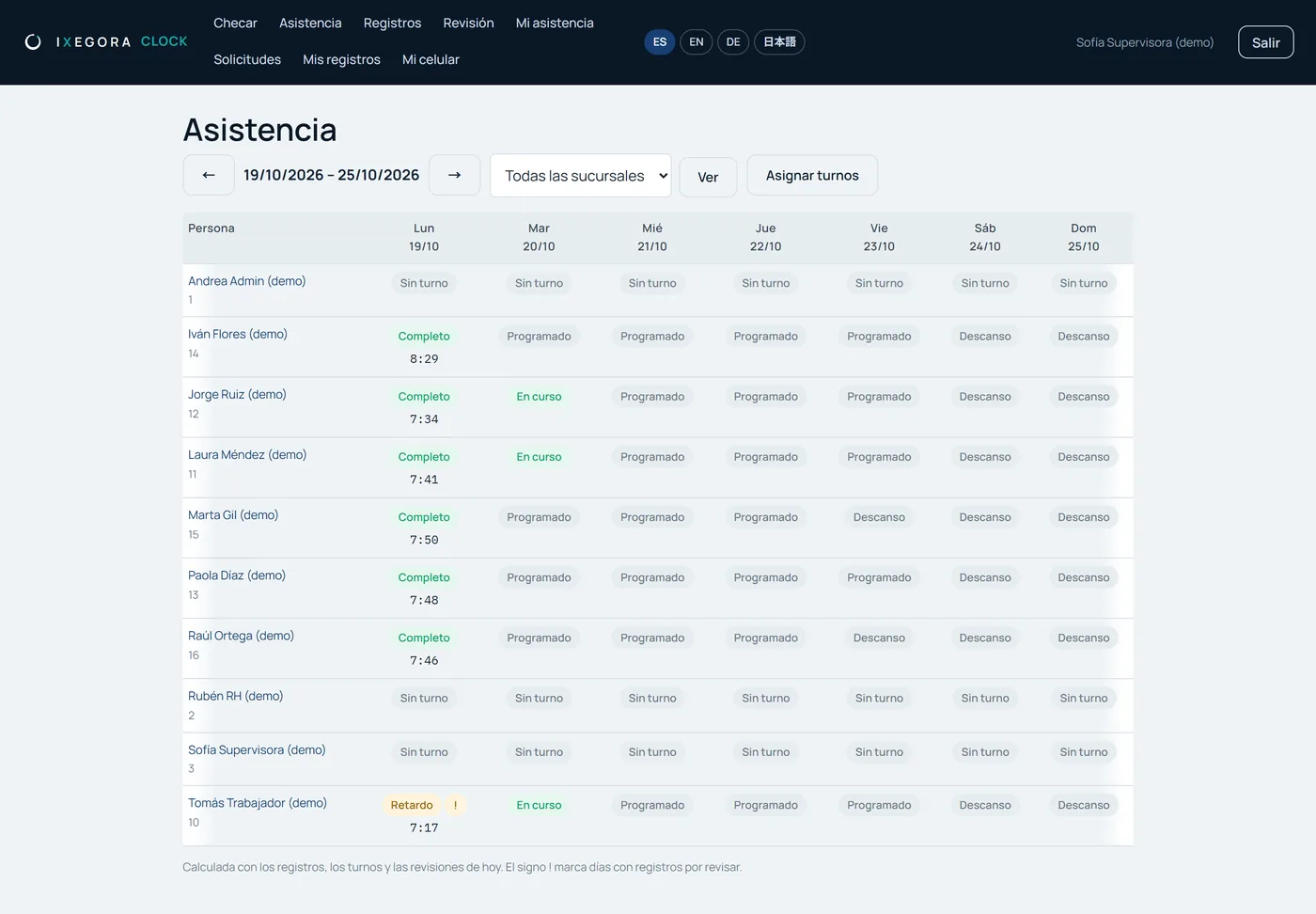
Real attendance screen of Ixegora Clock: lateness, absences and overtime per person and day

Tamper-evident records

Each check-in is chained to the previous one: any alteration is detected.

Corrections with a trail

Who asked, who approved and why. The original record does not change.

Requests

Missed check-ins, leave, vacation, sick leave and overtime, with their approval.

Signed close

Period validated by the supervisor, confirmed by the person and sealed by HR.

Everyone sees their own

People see their own records; supervisors, only their team.

In 4 languages

Spanish, English, German and Japanese, for teams with a foreign parent company.

PRIVACY

Just what time recording needs, nothing more

No biometrics

The phone validates with its own fingerprint or face; Ixegora never receives or stores that data.

Location only at check-in

One point at the moment of check-in, never in the background.

Separate database

Time records live apart from Ixegora's reports: no query can join them.

TO GET STARTED

What you need, and nothing more

  1. 01

    Your list of people

    Name and employee number in a CSV: that sets everyone up at once.

  2. 02

    Your sites

    With their time zone and, if you want a geofence, their location.

  3. 03

    A tablet or the phones

    Any tablet with a browser at the entrance, or each person's phone.

  4. 04

    The agreement

    We start from a template; review it with your labour lawyer before publishing it.

PRICING

Per active worker, in tiers

You only pay for people who checked in at least once that month. The first 100 keep their rate and only the next ones pay the lower one.

Up to 100 active

$19.99 MXN + VAT
per active worker / month
  • Tablet with PIN and QR
  • Phone with fingerprint and location
  • Agreement and records file
Request Ixegora Clock

More than 500

Agreed rate
per active worker / month
  • Everything above
  • Agreed price per active worker
  • Assisted onboarding
Request Ixegora Clock
Example:

With 150 active workers: 100 × $19.99 + 50 × $14.99 = $2,748.50 per month.

Minimum 10 workers per month. One-time setup of $1,499. Billed at the end of each month, on that month's active workers.

Already using Ixegora?

Your whistleblowing channel and your time recording with the same provider, and 20% off Clock.

Ixegora for companies
FREQUENTLY ASKED

What we get asked about time recording

Since when is electronic time recording mandatory?

The obligation has been in Mexico's Federal Labour Law since May 1, 2026 (art. 132, sec. XXXIV). The STPS provisions setting who it applies to and its exceptions take effect on January 1, 2027 (fifth transitional article of the decree).

We already have a time clock. Do we have to replace it?

Not necessarily. If it records each person's start and end time and you can export it, it may do the job; check that you have an agreement accepted by each person and a trail of corrections. If any of that is missing, Clock runs on tablets and phones you already have, with nothing to install.

Do I need to buy a time clock?

No. The law requires the record to be electronic but does not set a method or a device. Ixegora Clock works with a tablet or with each person's phone.

What happens if the internet goes down?

The tablet stores the check-in encrypted and sends it on its own when the connection returns, and the phone signs it on the spot. The record arrives flagged, with the device's time and the time it arrived.

Does Ixegora store workers' fingerprints or faces?

No. With the phone, the phone itself validates the fingerprint or face, and Ixegora only receives a public key. The tablet uses a PIN.

How much does it cost?

$19.99 per active worker per month up to 100, and $14.99 from 101 to 500, in tiers, plus VAT, with a minimum of 10 workers. Active means checked in at least once that month.

How is the record handed to the authorities?

Clock exports each period's records file, for the whole company, a site or a person, in PDF and CSV, with the digital fingerprints that show nothing changed.
Be recording by January 1.

Try it today with fictional data or request your setup: we do it with you.